
DeleteEmptyFolders
Keep your file system clean by easily finding and removing empty folders
What is DeleteEmptyFolders?
DeleteEmptyFolders is a Windows utility that adds a Delete Empty Folders command to File Explorer's context menu when you right-click on one or more folders.
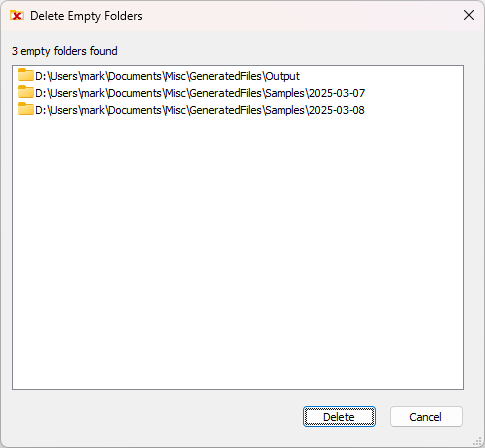
When you select this command, it scans the selected folders and displays a dialog listing all empty folders found (including folders that contain only empty subfolders). You can then choose which empty folders to delete.
Key Features
Context Menu Integration
Adds a convenient Delete Empty Folders command directly to File Explorer's right-click context menu.
Smart Scanning
Finds all empty folders, including folders that contain only empty subfolders, ensuring thorough cleanup.
Safe Deletion
Review all empty folders before deletion. Non-empty folders are protected from accidental deletion.
Quick Single Folder Delete
When right-clicking on a single empty folder, it bypasses the dialog and deletes immediately for convenience.
Batch Processing
Select multiple folders to scan and clean them all at once, saving time on large cleanup tasks.
Clutter-Free File System
Keep your directories organized and clean by easily identifying and removing unnecessary empty folders.
How It Works
DeleteEmptyFolders dialog showing a list of empty folders ready to be deleted
How to Use
Select Folders
Right-click on one or more folders in Windows File Explorer
Run the Command
Choose Delete Empty Folders from the context menu
Review and Delete
Review the list of empty folders found and select which ones to delete
Why Use DeleteEmptyFolders?
Keep Your File System Clean
Easily identify and remove empty folders that accumulate over time, keeping your directories organized and clutter-free.
Peace of Mind
Non-empty folders are automatically protected from accidental deletion, giving you confidence when cleaning up your system.
Save Time
No more manually searching through folder hierarchies. Scan multiple folders at once and clean them up in seconds.
Simple and Easy
Integrates seamlessly with File Explorer's context menu. No complicated setup or learning curve required.